Tell Us About Your Project


Animatronic Maintenance Schedule With Five Routine Checkpoints
Effective Animatronic Maintenance is the backbone of long-term equipment reliability. Handing over an animatronic installation isn’t the finish line. It’s the moment real-world operation begins.
Crowds increase. Dust builds up inside cabinets. Operators press emergency stops hundreds of times a month. Small issues that seem harmless during installation slowly turn into downtime, guest complaints, and expensive repairs if no preventive routine exists.
After years of tracking field performance across animatronic animals, animatronic dinosaur exhibits, and themed attraction installations worldwide, one pattern stands out clearly: sites with structured preventive maintenance consistently keep their exhibits operating smoothly for 7+ years, while sites that rely purely on reactive repairs often begin facing joint stiffness, audio drift, overheating, and controller instability within 18–24 months.
The hardware usually isn’t failing early.
The maintenance schedule is.
This guide breaks the workflow into five routine checkpoints — daily observation, weekly cleaning, monthly calibration, quarterly diagnostics, and annual overhaul planning.
Each checkpoint is designed around one goal:
Catch small deviations before they become operational failures.
Table of Contents
Five Routine Checkpoints at a Glance
| Maintenance Layer | Frequency | Main Responsibility | Primary Goal |
|---|---|---|---|
| Visual Inspection | Daily | Floor Operators | Detect visible abnormalities |
| Cleaning & Vent Care | Weekly | Operators | Prevent overheating & dust buildup |
| Mechanical Adjustment | Monthly | Technical Staff | Maintain motion precision |
| Diagnostics & Backup | Quarterly | Engineers | Prevent controller & sensor failure |
| Overhaul & Replacement | Annually | Engineering Team | Extend lifecycle & reduce downtime |
Why “Install and Forget” Costs More Than You Think
It’s easy to assume that once an animatronic figure or animatronic system is installed and programmed, it will continue operating normally for years with minimal attention.
Real-world operation works differently.
Animatronic equipment operates under continuous mechanical stress, environmental exposure, thermal fluctuation, and unpredictable visitor interaction. Dust accumulates inside control cabinets. Lubricants degrade under heat. Connectors loosen under repetitive motion cycles. Small alignment shifts gradually affect motion precision.
Ignoring these early-stage issues doesn’t eliminate maintenance costs.
It simply converts predictable operating expenses into emergency repairs, attraction downtime, lost ticket revenue, and frustrated guests.
We’ve observed this repeatedly across long-term attraction projects. Sites performing a simple 10-minute daily inspection routine consistently maintain lower repair frequency and longer component lifespan than sites waiting for visible failure before reacting.
Preventive maintenance flattens the degradation curve.
A cleaned vent today may prevent a controller shutdown six months later. A quarterly re-torque may prevent structural fatigue during peak-season operation. A backed-up controller configuration may save days of reprogramming after an unexpected fault.
Small interventions prevent large failures.
Reducing unexpected downtime is one of the primary goals of preventive animatronic maintenance.
See how this maintenance workflow helped maintain motion precision within 0.3° after five years at the Malaysia Indoor Dinosaur Theme Project (National Science Center, 2nd Floor).
Daily and Weekly Routines for On-Site Operators
Floor operators are not engineers.
Their maintenance checklist should be visual, simple, repeatable, and fast to execute during opening and closing procedures.
The goal at this stage is not deep technical diagnosis.
The goal is early abnormality detection.
Daily & Weekly Inspection Checklist
| Checkpoint | Frequency | What to Do | What to Log | Red Flag |
|---|---|---|---|---|
| Visual & Skin Inspection | Daily | Run full motion sequence at low speed. Watch for uneven skin stretching, seam separation, bubbling, or paint wear on high-contact areas. | Photo + location note | Cracks >2mm, seam separation, bubbling |
| Audio Sync & Volume | Daily | Observe roar timing, head turns, tail movement, and speaker output consistency. | Timestamp + symptom | Persistent drift, crackling, mute zones |
| Emergency Stop Test | Per Shift | Press every E-stop button. Confirm immediate power cutoff and normal reset behavior. | Pass/Fail + reset time | Delay >0.3s, fault code on reset |
| Dust & Vent Cleaning | Weekly | Clean cabinet filters, base grilles, and neck joints using dry microfiber tools. | Filter status + internal temp | Cabinet temp >45°C |
| Cable Strain Relief | Weekly | Inspect cable routing, ties, and bend radius near moving joints. | Tension condition | Fraying, exposed shielding, loose clamps |
Why These Checks Matter
Many major failures begin as small visual symptoms.
This is especially common in high-cycle animatronic figures operating inside theme parks, museums, and indoor attractions.
Audio drift often appears weeks before a larger actuator or controller issue. Uneven motion speed may indicate early lubrication breakdown. Rising cabinet temperatures usually point to blocked airflow long before a thermal shutdown occurs.
If operators can identify these warning signs early, technical teams can intervene before guest-facing failures occur during operating hours. If a sudden fault does occur, follow our modular troubleshooting workflow to isolate the issue and restore operation in hours, not days.
Tip: Print this checklist as a laminated one-page SOP sheet and place it directly at the control station. Operators check items daily, supervisors verify weekly.
Monthly and Quarterly Protocols for Technical Staff
Operators detect symptoms.
Technicians identify causes.
For large animatronic systems, preventive calibration often determines whether equipment maintains stable motion synchronization over multiple operating seasons.
This layer of the animatronic maintenance schedule shifts from observation to measurement, calibration, and system correction.
Technical Maintenance Protocols
| Task | Frequency | Key Action | Acceptance Standard | Common Pitfall |
|---|---|---|---|---|
| Joint Lubrication | Monthly | Apply lubricant only to specified fittings. Remove excess immediately. | Even coverage, no buildup | Over-lubrication traps dust and accelerates wear |
| Bolt Re-Torque | Quarterly | Inspect structural mounts and actuator brackets using calibrated torque tools. | Within ±5% factory Nm spec | Over-tightening cracks brackets or strips threads |
| Connector Inspection | Quarterly | Check for terminal push-back, looseness, and corrosion. | Resistance <0.5Ω | Small connector gaps cause intermittent signal loss |
| Software Backup | Quarterly | Export motion profiles, I/O mappings, and fault logs before updates. | Stable backup saved | Deleting logs before identifying root cause |
| Grounding Test | Monthly | Measure earth resistance at control panel and baseplate. | ≤2Ω | Poor grounding causes false trips and encoder instability |

Maintenance Problems Often Begin During the Design Phase
Many long-term service issues are not caused by hardware defects.
They begin during layout planning.
Tight access space, hidden control cabinets, and sealed decorative structures often force technicians to dismantle surrounding scenery simply to inspect one actuator or replace one cable.
For indoor attractions between 300–800㎡, we strongly recommend reserving:
- Dedicated maintenance corridors
- Removable access panels
- Ventilation clearance around cabinets
- Service access near neck and tail mechanisms
- Cable inspection points near repetitive motion zones
Maintenance-friendly layouts significantly reduce long-term downtime and labor costs.
The Annual Overhaul & Local Parts Sourcing Guide
Annual maintenance is not just a larger monthly inspection.
It is a scheduled teardown, measurement, replacement, and lifecycle management process.
Think of it as preventive overhaul — not emergency repair.
Wear-Part Replacement Baseline
We recommend replacing high-wear components according to operating cycles and service intervals rather than waiting for visible failure.
A $45 seal replaced during scheduled maintenance costs far less than a fluid leak during peak visitor traffic.
| Component | Expected Lifespan | Local Price Range (USD) | Recommended Brands | Sourcing Notes |
|---|---|---|---|---|
| Harmonic Drive Grease | 12–18 months | $18–$35/kg | Mobil SHC, Kluber, Shell Gadus | Avoid generic multi-purpose grease |
| Silicone Seals / Gaskets | 24–36 months | $8–$22/piece | Parker, Trelleborg, SKF | Match Shore hardness & skin compatibility |
| Control Cabinet Fans | 18–24 months | $25–$45/unit | ebm-papst, Delta, Sunon | Match airflow, voltage, mounting size |
| Limit Switches / Sensors | 36–48 months | $12–$30/unit | Omron, Sick, Pepperl+Fuchs | Verify signal type & IP rating |
| High-Flex Cables | 30–40 months | $35–$80/m | igus, Lapp Kabel, Belden | Use drag-chain rated cable only |
Local Sourcing Reality Check
Replacement components for animatronic equipment are usually available locally in most major markets across North America, Europe, Southeast Asia, and the Middle East.For large animatronic dinosaur attractions and themed entertainment projects, maintaining spare inventory is often more cost-effective than emergency shutdown recovery.
However, incorrect substitutions remain one of the most common maintenance mistakes.
Before purchasing replacement parts:
- Cross-reference voltage, IP rating, and signal type
- Verify connector compatibility before installation
- Keep backup inventory for critical components
- Test new parts on non-critical motion axes first
- Request CE/RoHS compliance documentation when required
Downtime costs significantly more than maintaining a small spare inventory.
Five Costly Maintenance Mistakes (And How to Avoid Them)
1. Over-Lubricating Mechanical Joints
Excess grease attracts dust and abrasive particles, eventually turning lubrication points into grinding paste.
Always follow manufacturer lubrication specifications.
2. Ignoring Minor Error Codes
Repeated “comm timeout” or “over-temperature” warnings are rarely random glitches.
They usually indicate airflow restriction, connector instability, or sensor degradation developing over time.
Log recurring warnings immediately and investigate before full shutdown occurs.
3. Allowing Untrained Staff to Reset Controllers
Factory resets and uncontrolled parameter changes can erase custom motion limits, synchronization settings, and safety configurations.
Only authorized technicians should access advanced parameter menus.
4. Skipping Thermal Checks During Summer Operation
Ambient heat combined with motor heat and direct sunlight creates compound thermal stress.
Blocked airflow can quickly push internal cabinet temperatures beyond safe operating limits during peak-season operation.
5.Using Harsh Chemicals on Animatronic Skin and Surface Materials
Bleach, acetone, and high-pressure cleaning systems degrade protective coatings and weaken flexible skin materials.
Use mild soap solutions and manufacturer-approved protectants only.
On-Site Training During Installation
An animatronic maintenance schedule only works if the operating team fully understands the equipment and motion control system.
That’s why our installation process includes on-site operational training directly during project commissioning.
When the Sanhe technical team completes installation, one engineer remains on-site to guide operators and maintenance staff through:
- Daily startup/shutdown routines
- Emergency stop procedures
- Motion observation points
- Weekly inspection workflows
- Basic troubleshooting logic
- First-30-day operational precautions
This training happens directly on the installed equipment — not through generic presentation slides.
What’s Included in the Project Handover
Every Sanhe Creature project includes a complete after-sales technical package as part of standard delivery.
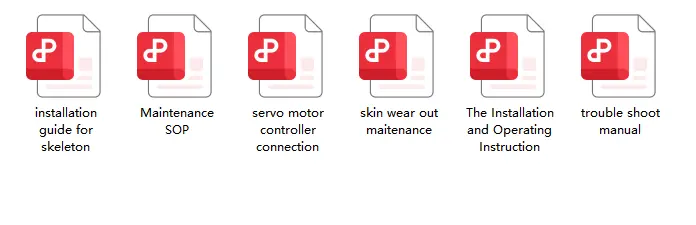
The documentation package includes:
- Full operation manual
- Maintenance SOP documentation
- Servo & control wiring references
- Skin repair guidelines
- Troubleshooting handbook
- Backup configuration files
- Printed + digital technical copies
- Direct engineering support contact
These materials are delivered directly to your operations team during installation handover.
No additional request process. No hidden access portal.
Reliable Operation Is Never Accidental
Reliable animatronic maintenance is never the result of luck.
Whether managing animatronic animals, animatronic dinosaurs, or large-scale themed attraction equipment, long-term operational stability always depends on structured preventive maintenance.
It comes from consistent inspection routines, disciplined documentation, and fast response to small abnormalities before they escalate into system-wide failures.
A structured maintenance schedule protects more than equipment.
It protects guest experience, operational uptime, and long-term attraction ROI.
That’s why every Sanhe Creature project includes operator training, maintenance documentation, and long-term technical support from the very beginning — not as an optional afterthought, but as part of the engineering system itself.
Frequently Asked Questions About Animatronic Maintenance How often should animatronic animals be maintained?
Think of it like a car: you don’t wait for the engine to knock before changing the oil. Do a 5-minute visual/safety walkaround daily, a quick lubrication/vent check weekly, and let a tech run diagnostics quarterly. Skip these, and you’ll see motion precision drop 30-40% in just a few months. It’s not about paperwork—it’s about catching small issues before they become $10k repairs.
What are the primary causes of animatronic overheating?
Usually it’s a combo: dust-clogged vents + old grease getting thick + running in 40°C ambient without extra cooling. The control cabinet is the weak spot—keep airflow clear, use synthetic lubricants rated for high temp, and don’t ignore the “over-temp” warning codes. They’re not glitches; they’re your system asking for help.
How long do animatronic components typically last?
With proper care, the big mechanical parts (actuators, gearboxes) can go 7+ years. Electronics (sensors, fans) are more like 2-4 years—they’re just high-wear items. The key isn’t hoping they last; it’s replacing them on a schedule, before they fail mid-season. Reactive repair always costs more than planned swaps.
Can animatronics operate indefinitely without maintenance?
Short answer: no. They’re working machines, not statues. Dust, vibration, temperature swings, and visitor interaction all add up. “Install and forget” is how a $500 seal failure turns into a $12k emergency rebuild. A 10-minute daily check saves weeks of downtime later.
What is the single biggest maintenance mistake?
Ignoring the small warnings. A recurring “comm timeout” or a joint that’s slightly stiff isn’t random—it’s the system telling you something’s degrading. Log it, trace it, fix it now. Waiting until it stops moving on a Saturday afternoon is how small issues become major headlines.
How often should animatronic animals be maintained?
Think of it like a car: you don’t wait for the engine to knock before changing the oil. Do a 5-minute visual/safety walkaround daily, a quick lubrication/vent check weekly, and let a tech run diagnostics quarterly. Skip these, and you’ll see motion precision drop 30-40% in just a few months. It’s not about paperwork—it’s about catching small issues before they become $10k repairs.
What are the primary causes of animatronic overheating?
Usually it’s a combo: dust-clogged vents + old grease getting thick + running in 40°C ambient without extra cooling. The control cabinet is the weak spot—keep airflow clear, use synthetic lubricants rated for high temp, and don’t ignore the “over-temp” warning codes. They’re not glitches; they’re your system asking for help.
How long do animatronic components typically last?
With proper care, the big mechanical parts (actuators, gearboxes) can go 7+ years. Electronics (sensors, fans) are more like 2-4 years—they’re just high-wear items. The key isn’t hoping they last; it’s replacing them on a schedule, before they fail mid-season. Reactive repair always costs more than planned swaps.
Can animatronics operate indefinitely without maintenance?
Short answer: no. They’re working machines, not statues. Dust, vibration, temperature swings, and visitor interaction all add up. “Install and forget” is how a $500 seal failure turns into a $12k emergency rebuild. A 10-minute daily check saves weeks of downtime later.
What is the single biggest maintenance mistake?
Ignoring the small warnings. A recurring “comm timeout” or a joint that’s slightly stiff isn’t random—it’s the system telling you something’s degrading. Log it, trace it, fix it now. Waiting until it stops moving on a Saturday afternoon is how small issues become major headlines.
Written by Wang Chao | Engineering & Installation Director at Sanhe
Wang Chao has participated in the installation and commissioning of large-scale animatronic dinosaur projects across theme parks, museums, and commercial attractions worldwide, with practical experience in long-term equipment operation and maintenance systems.