Tell Us About Your Project

When Your Animatronic Stops Moving: Troubleshooting Guide & Modular Repair Strategies
When an animatronic system suddenly stops moving during peak visitor hours, the first instinct is usually panic. Operators begin opening panels, swapping parts, and restarting controllers without understanding the real cause.
That’s often how a 20-minute issue becomes a three-day attraction downtime problem.
After supporting themed attractions, animatronic dinosaur exhibits, museums, and interactive entertainment projects worldwide, we’ve learned one important lesson:
Effective animatronic troubleshooting always starts with isolation — not disassembly.
[Note: If you are looking for routine care and long-term upkeep procedures, please refer to our [Comprehensive Animatronic Maintenance Guide] first. This article focuses specifically on urgent recovery protocols when the system is already down.]
This guide explains the exact troubleshooting workflow our field engineers use when an animatronic figure halts, drifts, overheats, or throws repeated fault codes. You’ll learn the 15-minute triage process, rapid diagnostic logic, modular repair strategies, remote support workflow, and preventive maintenance practices that reduce unexpected downtime.
No theory. Just real-world animatronic maintenance procedures that work during live operation.
Table of Contents
The First 15 Minutes: Triage Before You Touch a Wrench
When an animatronic not moving issue occurs, do not immediately start replacing motors or opening the control cabinet.
Start by isolating the failure layer.
Most animatronic system failure cases come from four primary sources:
- Power interruption
- Signal communication loss
- Mechanical binding
- Corrupted motion parameters
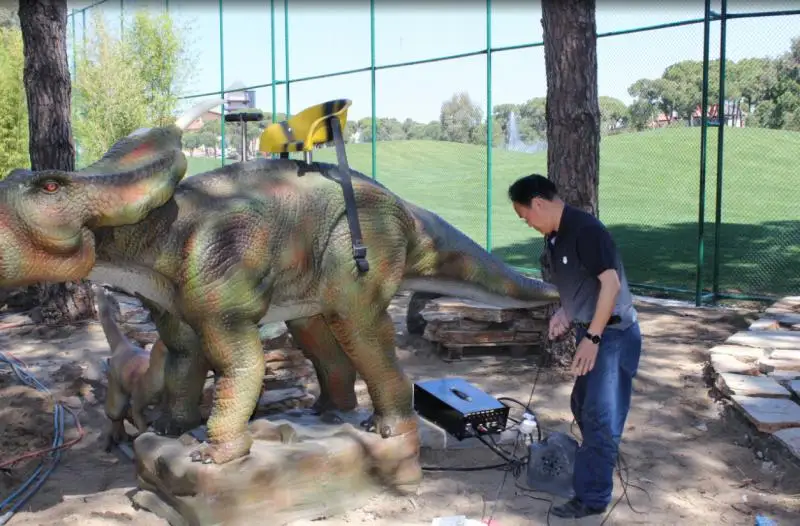
Skipping directly to component replacement usually wastes valuable repair time.
This rapid troubleshooting workflow is commonly used for animatronic maintenance inside theme parks, museums, dinosaur exhibits, and interactive attractions during peak visitor operation.
1. Power & Safety Loop
Start with the most basic electrical checks.
Inspection Steps
- Check main breaker status and UPS voltage
- Verify all emergency stop buttons are fully released
- Confirm the safety loop is closed in accordance with international machinery safety standards like ISO 13849.
- Inspect cabinet indicators for tripped breakers or ground faults
Common Failure Causes
- Loose power terminals
- Ground fault trips
- Emergency stop chain interruption
- Voltage fluctuation inside control systems
Many attraction downtime incidents are caused by unstable grounding rather than failed hardware.
2. Signal & Communication Diagnostics
If power is stable, move to communication diagnostics.
Inspection Steps
- Read controller LED status:
- Power
- Communication
- Fault
- Network handshake
- Inspect CAN bus, RS485, or Ethernet terminations
- Measure 24VDC sensor supply voltage
Troubleshooting Standards
If voltage fluctuates more than 10%, the issue is usually:
- Ground instability
- Connector looseness
- Cable fatigue
- Signal interference
This type of animatronic troubleshooting is especially common in large animatronic dinosaur attractions operating long daily cycles.
3. Mechanical Binding Inspection
Before replacing actuators or servo motors, verify the axis can move freely.
Inspection Steps
- Disable power completely
- Rotate each axis manually through full travel range
- Listen for:
- Grinding
- Sudden resistance
- Irregular friction
- Check decorative structures and external interference
Common Mechanical Problems
- Worn bearings
- Damaged harmonic drives
- Dry lubrication points
- Foreign object interference
- Structural misalignment
Many operators misdiagnose mechanical resistance as electrical failure.
4. Software & Parameter Verification
Modern animatronic systems rely heavily on synchronized motion profiles and controller parameters.
Inspection Steps
- Export fault logs before resetting anything
- Verify motion profile integrity
- Check firmware consistency across drives
- Confirm encoder mapping remains synchronized
Mismatched firmware versions frequently cause silent communication desynchronization inside animatronic control systems.
Top 5 Common Animatronic Failures & Diagnostic Paths
During high visitor traffic, operators need a simplified troubleshooting structure instead of a full engineering manual.
| Symptom | Quick Check | Likely Cause | Typical Fix Time | Escalate? |
|---|---|---|---|---|
| Animatronic not moving | Breaker, E-stop chain, UPS | Power interruption, safety loop open | 10–20 min | Yes if breaker retrips |
| Single axis frozen | Manual rotation test | Bearing seizure, motor overheat | 30–60 min | Yes if gearbox has play |
| Audio desync | Speaker cable, media path | SD corruption, clock mismatch | 15–30 min | Yes if comm timeout appears |
| Erratic motion / jitter | Encoder feedback | PID drift, encoder offset | 45–90 min | Yes if waveform spikes |
| Controller reboot loop | Thermal logs, grounding | Overheating, corrupted config | 20–40 min | Yes if repeated fault codes |
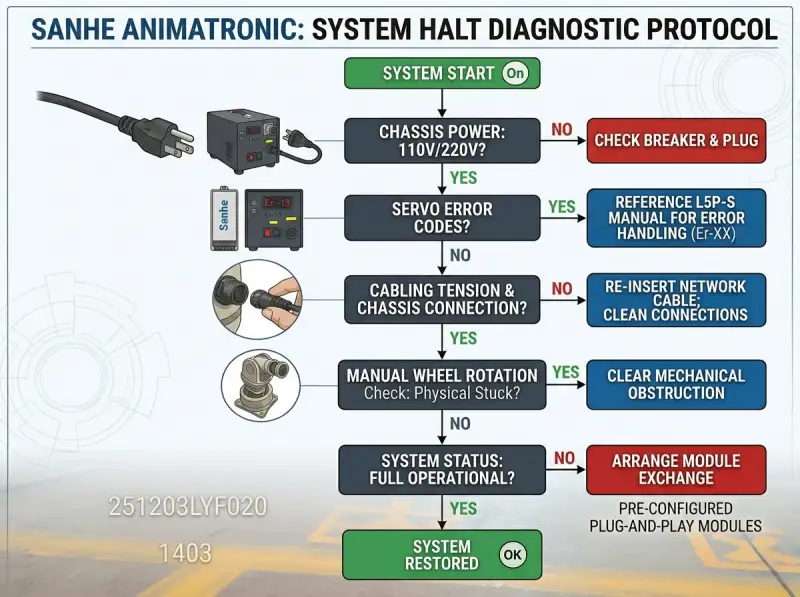
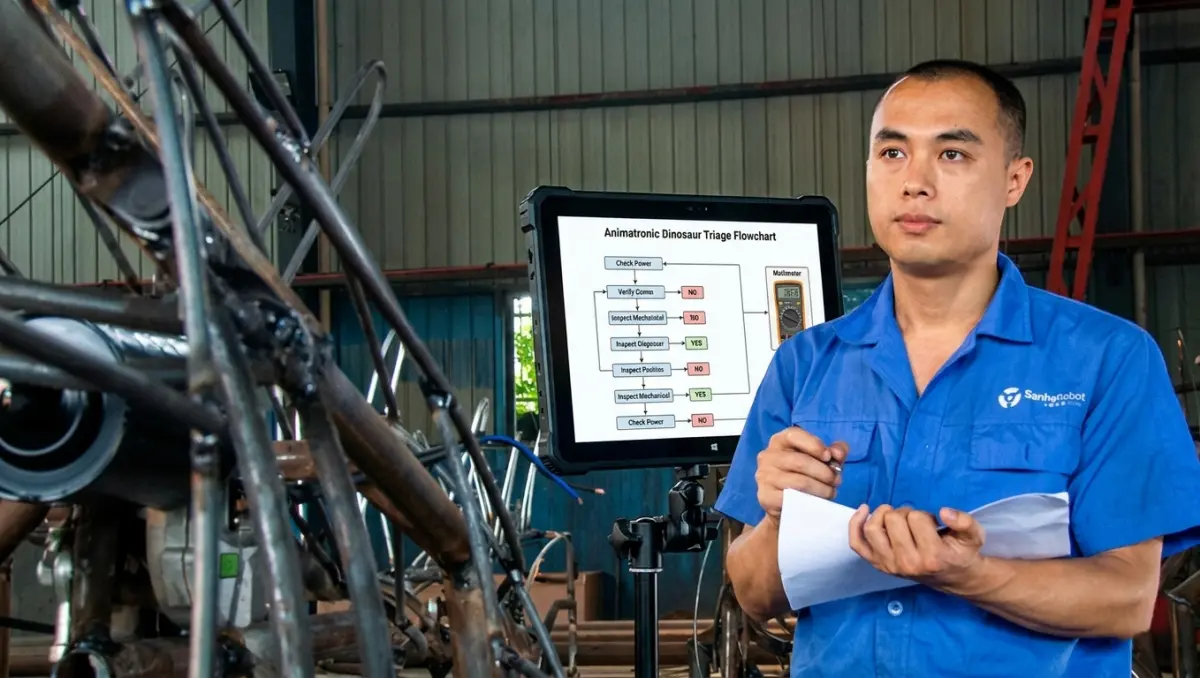
Use the matrix above to identify the symptom, then follow the System Halt Diagnostic Protocol (Flowchart) to isolate and resolve the issue step-by-step.
In emergency conditions, clear workflow reduces attraction downtime far more effectively than lengthy documentation.
Why Modular Repair Strategies Reduce Attraction Downtime
Traditional animatronic repair often treats the entire structure as one integrated assembly.
That approach creates long shutdown cycles.
A failed joint motor can force complete disassembly, factory return, and multi-day downtime.
Modern modular repair strategy changes that completely.
We design animatronic systems using:
- Quick-release flanges
- Modular servo assemblies
- IP67 rated quick connectors
- Pre-configured parameter backups
- Plug-and-play replacement architecture
This dramatically improves field repair efficiency.
| Repair Type | Traditional Downtime | Modular Repair Time | Required Tools |
|---|---|---|---|
| Joint drive replacement | 5–7 days | 2–4 hours | Torque wrench + hex tools |
| Control board replacement | 10–14 days | 45 minutes | USB backup + anti-static tools |
| Cable/sensor replacement | 3–5 days | 1–2 hours | Multimeter + wire tools |
For large theme park animatronic projects, modular repair strategy can reduce downtime costs by tens of thousands of dollars during peak season.
Field Swap Protocol: What Can Be Replaced On-Site?
One of the biggest mistakes in animatronic troubleshooting is attempting advanced calibration without engineering guidance.
Not every component should be serviced locally.
✅ Safe for On-Site Replacement
- Cooling fans
- Cabinet filters
- Lubrication fittings
- Limit switches
- Quick-disconnect cables
- Standard servo motors
These are standard preventive maintenance items.
⚠️ Requires Remote Engineering Guidance
- Absolute encoder calibration
- PID parameter tuning
- Multi-axis synchronization
- Cross-version firmware upgrades
Improper adjustment often creates larger animatronic system failure issues later.
❌ Factory-Level Intervention Required
- Structural frame cracking
- Main PCB damage
- Hydraulic valve block failure
- Severe skin matrix tearing
- Large-scale weld fatigue
Attempting local repair on these systems usually increases restoration cost.
5-Step Modular Replacement Workflow
1. Lockout & Tagout
Completely isolate power and verify zero-energy condition.
2. Backup & Documentation
Before removal:
- Export controller configuration
- Photograph wiring routes
- Document connector layouts
This step is critical during animatronic maintenance.
3. Remove Old Module
- Mark torque values
- Avoid forcing seized fasteners
- Inspect surrounding structure for secondary wear
4. Install New Module
- Hand-tighten first
- Verify free manual movement
- Reconnect communication lines carefully
5. Validate & Log
Run empty-cycle testing.
Record:
- Current draw
- Operating temperature
- Motion smoothness
- Fault behavior
Every animatronic repair should update the maintenance ledger.
Remote Diagnostics: Faster Than Shipping Hardware
Most modern animatronic troubleshooting can be handled remotely if proper data is collected.
In many cases, shipping the entire unit is unnecessary.
Remote engineering support can solve over 90% of controller and motion issues when operators provide structured diagnostic information.
What to Export Before Contacting Support
Always provide:
- Fault timestamps
- Motion parameter backups
- Error history logs
- Temperature/current graphs
- Video of abnormal behavior
Bad data delays troubleshooting.
Good data accelerates repair.
How to Record a Useful Diagnostic Video
Best Practices
- Use a tripod or stable camera
- Capture the full movement range
- Include original mechanical audio
- State:
- Unit ID
- Axis number
- Last normal operating time
Mechanical noise often reveals whether the issue is electrical or structural.
Emergency Downtime Response During Peak Season
A failed animatronic figure is not only a technical issue.
It becomes an operational issue affecting guest flow and attraction experience.
Step 1: Isolate & Stabilize
- Shut down affected equipment
- Deploy safety barriers
- Redirect visitors immediately
Step 2: Document the Failure
Capture:
- Fault state
- Control cabinet indicators
- Recent maintenance activity
- Environmental conditions
Step 3: Activate Backup Operations
If backup exhibits exist:
- Reassign lighting sequences
- Adjust queue routing
- Shift presentation timing
The goal is minimizing guest impact.
Step 4: Escalate With Complete Data
Submit:
- Logs
- Photos
- Videos
- Fault history
Well-structured data dramatically shortens animatronic troubleshooting time.
Note: If you find yourself submitting detailed fault logs for the same unit multiple times within a season, your equipment may be nearing its performance ceiling. [Click here to evaluate whether it’s time to modernize, refurbish, or replace your aging animatronic assets.]
Turning Repairs Into Preventive Maintenance
Every repair reveals future risk patterns.
Effective preventive maintenance means learning from every failure event.
After any animatronic repair:
- Log root cause
- Increase inspection frequency
- Check adjacent axes
- Update maintenance workflow
Sites following structured preventive maintenance routines consistently reduce unexpected animatronic system failure by over 70%.
When maintenance becomes proactive, troubleshooting becomes verification instead of emergency response. We saw this first-hand in our [Taiwan Outdoor Forest Theme Park case study], where the client’s commitment to structured maintenance led to a full-system upgrade after eight years of continuous operation—a decision driven entirely by the reliability of the original installation. When your animatronics are maintained as long-term assets, they don’t just “work”—they continue to deliver value for years to come.
Frequently Asked Questions About Animatronic Troubleshooting
How often should animatronic systems be inspected?
Daily visual checks and weekly preventive maintenance are strongly recommended for high-cycle attractions to prevent minor wear from escalating into a total system halt.
What causes most animatronic overheating problems?
Blocked airflow, failed cooling fans, excessive ambient heat, and poor cabinet ventilation are the most common causes. Always ensure your control cabinet’s thermal environment is monitored to avoid unnecessary shutdown triggers.
Can operators reset controllers themselves?
Only trained technicians should perform controller resets. Incorrect resets can erase critical motion limits and synchronization parameters, which could lead to mechanical collision or further system damage.
What spare parts should attractions keep on-site?
Recommended inventory includes cooling fans, limit switches, high-flex cables, backup servo motors, and cabinet filters. Remember, the cost of unplanned downtime almost always exceeds the investment in essential spare parts.
Does modular repair affect motion precision?
No. Pre-calibrated modular assemblies maintain motion deviation within ±0.2° when proper installation and bolt-torquing procedures are followed. You get “factory-new” performance without the need for complex on-site recalibration.
Reduce Downtime Before It Happens
A troubleshooting guide only works when integrated into daily operation.
That’s why structured preventive animatronic maintenance remains the foundation of long-term attraction reliability.
Whether managing animatronic animals, animatronic dinosaurs, museum exhibits, or themed entertainment systems, operational stability always depends on fast diagnostics, preventive inspection, and modular repair readiness.
Reliable attractions are never maintained by luck.
They are maintained by systems.
Written by Wang Chao | Engineering & Installation Director at Sanhe
Wang Chao leads global installation and commissioning for large-scale animatronic projects. His work focuses on bridging the gap between factory-level precision and field-level operational reliability. He is a proponent of modular maintenance strategies and structured troubleshooting workflows, helping operators worldwide minimize downtime and maximize the longevity of complex interactive exhibits.